How to Book China Train Tickets on the 12306 English App
You search for a “12306 English app,” but all you can find is an app called 铁路12306, and much of it appears in Chinese. That’s where the confusion starts.
China Railway does not provide a separate app specifically called “12306 English App.” The official mobile application is Railway 12306, and its available language options can vary by device, region, and app version. Some users can switch it to English, while others may still see Chinese pages or struggle to find the language setting.
If you want a reliable English booking interface, the clearer option is the official 12306 English website. Foreign travelers can register with a valid passport, complete identity verification, search for trains, pay online, and manage eligible changes or refunds there.
This guide takes you through that website from the point where you start planning the journey to the moment you enter the station with your passport.
01. Make Sure You’re Using the Official 12306 Website
Open:
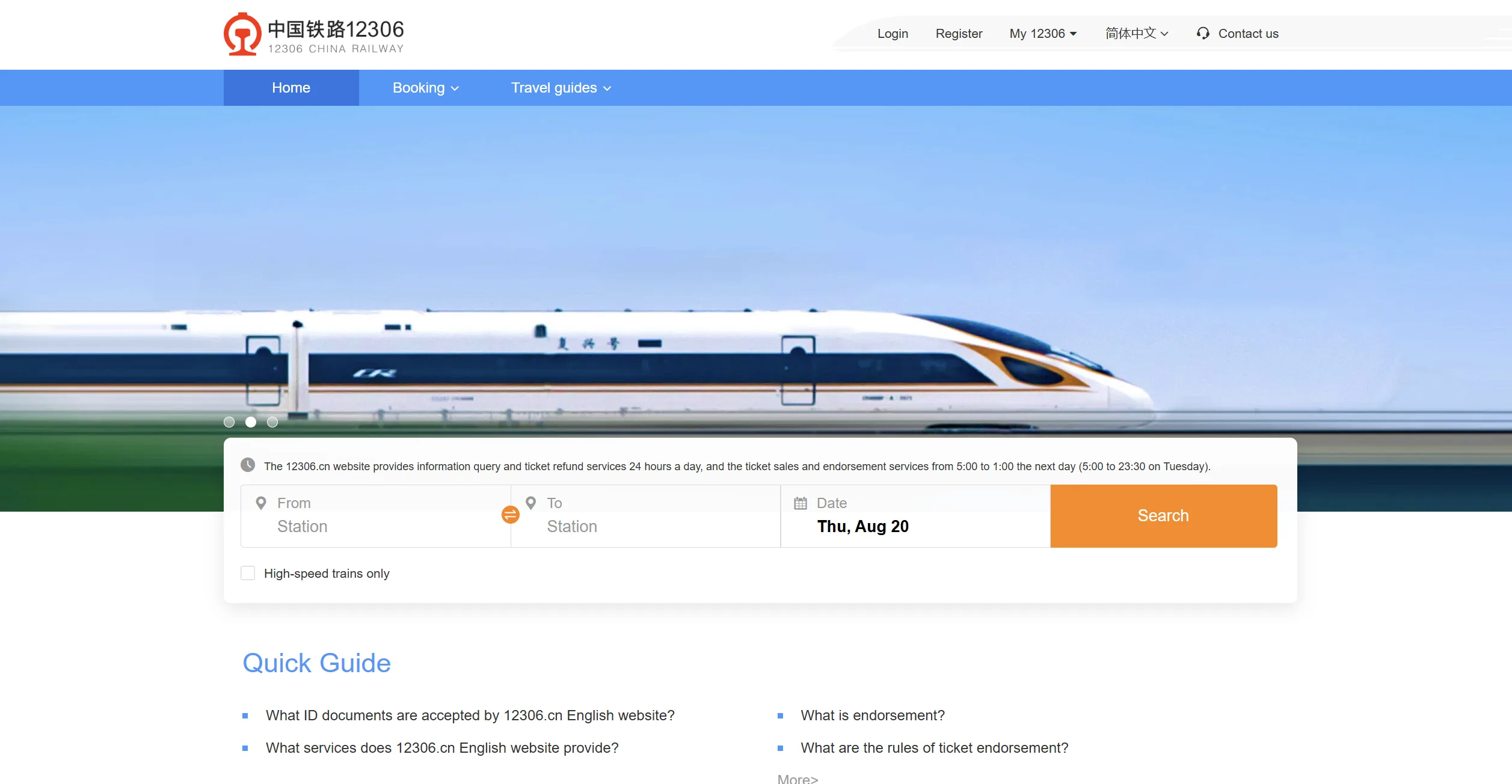
The website should display 12306 CHINA RAILWAY and show its main booking form in English.
Be careful when searching for 12306 through an app store or search engine. Several third-party services use “12306” in their names, but they are not the official China Railway platform.
China Railway states that 12306.cn and the Railway 12306 mobile app are its official online ticketing channels. If you book through another company, your payment, change, and refund requests may need to be handled by that company instead.
You don’t need to download an app to use the English website. It works in a browser on a phone, tablet, or computer.
02. Prepare Your Passport Before Registration
China uses real-name train tickets. The passenger name and passport number in your booking must match the original passport you carry to the station.
Before opening the registration form, prepare:
- Your valid foreign passport
- Full name as shown in the passport
- Passport number
- Nationality
- Passport expiration date
- Date of birth
- Email address
- A clear photo of the passport information page
The official 12306 English registration page currently accepts valid foreign passports for foreign-user registration. China’s government guidance also confirms that foreign travelers can use passports to buy train tickets through the 12306 website, app, booking hotline, or railway station ticket office.
Use the passport you’ll actually carry during the journey. If you book with an old passport and later travel with a replacement, the new document may not match the identity connected to the ticket.
03. Register a 12306 Account with Your Passport
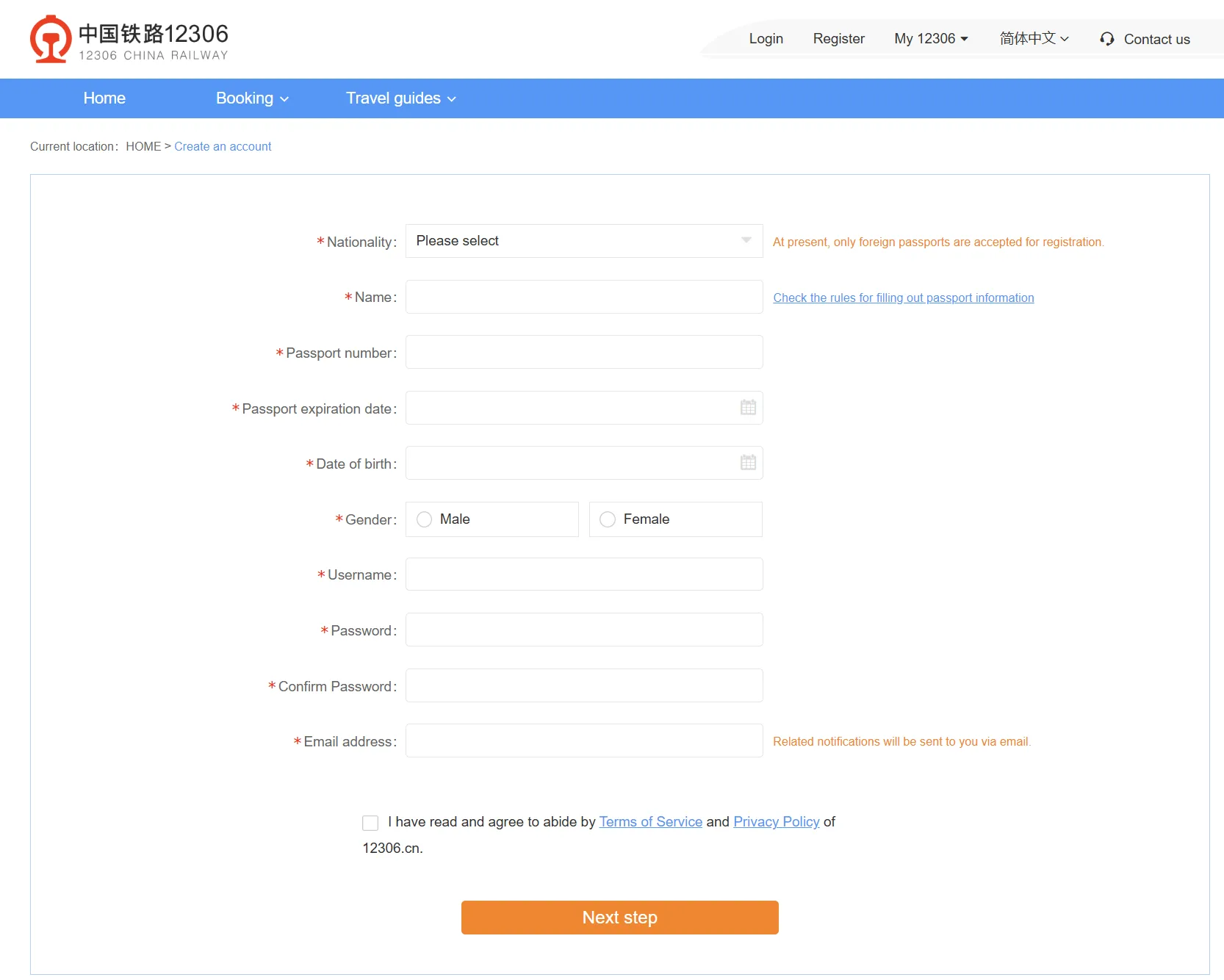
On the English website, select Register.
The registration form will ask for details such as:
- Nationality
- Name
- Passport number
- Passport expiration date
- Date of birth
- Gender
- Username
- Password
- Email address
Enter your name carefully
Use the name shown in the machine-readable section of your passport and follow the name-entry instructions displayed on the registration page.
Don’t use:
- A nickname
- A shortened first name
- A different spelling
- A name that doesn’t appear in the passport
- Chinese characters unless they form part of your official document name
If your passport includes several given names, don’t leave one out simply because you don’t normally use it.
Check the passport number
Passport numbers can contain both letters and numbers. Look carefully at characters such as:
Oand0Iand1Band8
A typing error can cause identity verification to fail or create trouble when the station checks the passport connected to the ticket.
Save your username
Your 12306 username is separate from your passenger name. Save it somewhere secure because you may need it when signing in later.
If the confirmation email doesn’t arrive, check your spam or junk folder before creating another account.
04. Complete Passport Identity Verification
Registering the account doesn’t always mean your identity is ready for ticket purchases.
Foreign passengers must complete identity verification before buying a real-name ticket. After you enter your passport information, the system may verify it automatically.
If automatic verification doesn’t work, you may be asked to upload a clear photo of the passport information page for manual review.
Make sure that:
- All four corners of the passport page are visible.
- The image is in focus.
- There is no glare across your name or passport number.
- The passport is still valid.
- Your typed details match the document.
- You selected the correct nationality and document type.
What if online verification fails?
Try uploading a new passport image in better lighting. Remove the passport from a reflective plastic cover and check every field again.
If the English website still cannot verify your passport, you can take the original passport to a railway station ticket office. Railway staff can assist with identity verification or sell the ticket at the counter.
Try to solve this before your travel day. Large railway stations can be busy, and sorting out an account problem shortly before departure adds unnecessary pressure.
05. Search Using the Full Station Name
Once your account and passport are accepted, return to the booking page and enter:
- Departure station
- Arrival station
- Travel date
Don’t look only at the city name. Most large Chinese cities have several railway stations, and they can be far apart.
Beijing, for example, has:
- Beijing Railway Station — 北京站
- Beijing West Railway Station — 北京西站
- Beijing South Railway Station — 北京南站
- Beijing North Railway Station — 北京北站
- Beijing Chaoyang Railway Station — 北京朝阳站
Shanghai has:
- Shanghai Railway Station — 上海站
- Shanghai Hongqiao Railway Station — 上海虹桥站
- Shanghai South Railway Station — 上海南站
- Shanghai West Railway Station — 上海西站
A ticket departing from Shanghai Hongqiao cannot be used at Shanghai Railway Station.
Before booking, check the station’s position on a current map and compare it with your hotel. Save the Chinese station name as well—it’s useful when booking a DiDi or showing the destination to a taxi driver.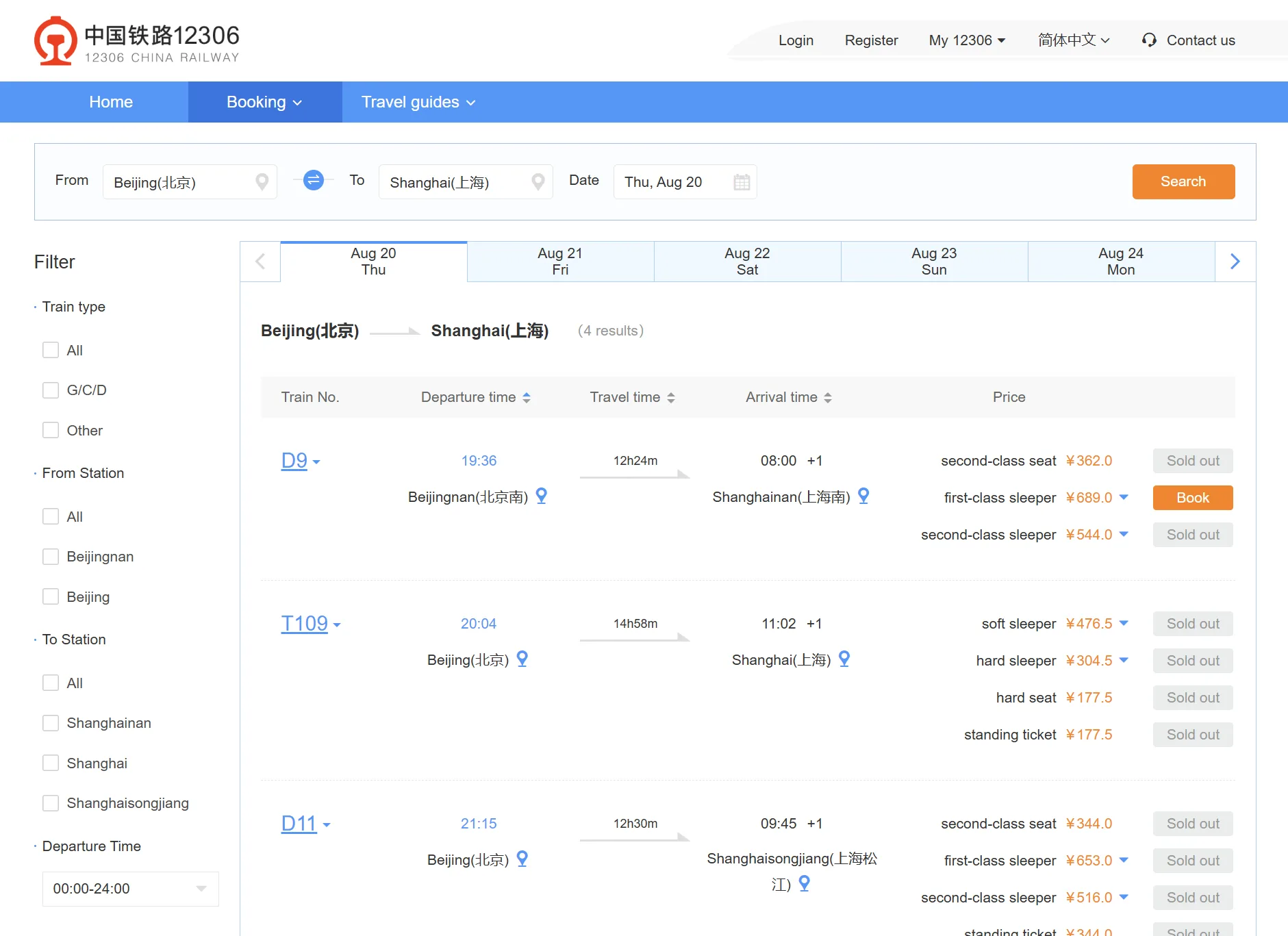
06. Understand the Train Results
China’s train numbers usually begin with a letter.
| Train type | What it generally means |
|---|---|
| G | High-speed train, usually the fastest option |
| D | High-speed or electric multiple-unit train |
| C | Intercity train |
| Z | Direct express conventional train |
| T | Express conventional train |
| K | Conventional fast train |
| Numbers only | Other conventional passenger services |
For most first-time visitors traveling between major cities, a G train is usually the easiest choice. These services are fast and commonly depart from larger high-speed railway stations.
Compare more than the fare. Check:
- Full departure station
- Full arrival station
- Departure time
- Journey duration
- Seat availability
- Distance from your accommodation
A slightly cheaper ticket may not be useful if the train leaves from a station on the other side of the city.
07. Choose Your Seat Class
High-speed trains commonly offer:
- Second Class
- First Class
- Business Class
Second Class is the standard choice for most travelers. It’s comfortable enough for normal journeys and costs less than First or Business Class.
First Class offers wider seats and more space.
Business Class is the premium option and can cost considerably more.
Conventional or overnight trains may display:
- Hard Seat
- Soft Seat
- Hard Sleeper
- Soft Sleeper
A Hard Sleeper is still a bed. The name refers to the more basic open sleeping arrangement, not to sleeping on a hard seat. A Soft Sleeper normally has fewer beds in a more private compartment.
Some booking pages may allow you to request a seat position, but your preference isn’t always guaranteed. The issued order will show the final coach and seat or berth number.
08. Select the Passenger and Check Everything Again
Your verified passport identity should appear in the passenger list.
If you’re buying a ticket for someone else, add that person separately under My Passengers and enter their own passport information.
Before you submit the order, check:
- Passenger name
- Passport number
- Train number
- Travel date
- Departure station
- Arrival station
- Departure time
- Seat class
Don’t assume the passenger name can be changed after payment. Train tickets are connected to a specific identity document and normally cannot be transferred to another person.
If the passenger information is wrong, you may need to cancel the ticket and make a new booking, subject to the current refund rules and seat availability.
09. Pay for the Ticket
After creating the order, complete payment before the payment time expires. An unpaid order doesn’t reserve the seat indefinitely.
China’s current government guidance states that foreign travelers can pay through the 12306 English website or app using supported Chinese or foreign bank cards and mobile payment services.
The options shown at checkout may include:
- Supported international bank cards
- Chinese bank cards
- Alipay
- WeChat Pay
- UnionPay
The available payment methods may vary according to your card, account, location, and the current checkout system. Follow the options displayed in your order rather than relying on an old screenshot from another guide.
If your foreign card is rejected
Check whether:
- Overseas transactions are enabled.
- Online payments are enabled.
- Your bank blocked the transaction.
- The billing information is correct.
- The card supports the payment verification requested.
You can also try:
- Another supported international card
- Alipay linked to an international card
- WeChat Pay linked to an international card
- Buying at a railway station ticket office
- Using a reputable third-party booking platform
After paying, return to your 12306 account and check that the order shows a successful or issued status. Don’t rely only on a bank notification.
10. Find Your E-Ticket Information
Once payment is successful, open the ticket order and check:
- Train number
- Departure date and time
- Departure and arrival stations
- Passenger name
- Coach number
- Seat or berth number
Save a screenshot so you can view the information without internet access.
The screenshot is helpful for finding the waiting area and showing staff your train number, but it isn’t your boarding document.
China Railway uses electronic tickets. Your valid ticket is connected to the passport used for the purchase.
You normally don’t need to collect a paper ticket or print the itinerary sheet. The official 12306 FAQ states that an itinerary sheet or reimbursement receipt cannot be used as a train ticket.
11. Take the Original Passport to the Station
Bring the same original passport used in the booking.
You may need it when:
- Entering the railway station
- Passing the boarding gate
- Going through an onboard ticket inspection
- Exiting at your destination
Some automatic gates can read foreign passports. If the machine doesn’t accept yours, use the staffed manual inspection lane.
Show the railway employee:
- Your original passport
- Your train order or screenshot if requested
Using the manual lane is normal for foreign passengers and doesn’t mean there is anything wrong with your ticket.
Don’t expect to board with:
- A passport photo on your phone
- A photocopy of the passport
- A different passport
- Only a booking screenshot
The original identity document used to buy the ticket is the important part.
12. Arrive Early Enough to Find the Gate
Chinese railway stations can be very large. You still need time for:
- Passport inspection
- Luggage security
- Finding the waiting hall
- Locating the boarding gate
- Reaching the correct platform
For your first high-speed train journey, arriving around 45–60 minutes before departure is a practical target. Allow more time during public holidays or at very large stations such as Beijing South, Shanghai Hongqiao, Guangzhou South, or Shenzhen North.
Your boarding gate can close before the train departs. Don’t treat the departure time as the time you should arrive at the gate.
Keep checking the station screens for:
- Train number
- Boarding gate
- Platform
- Boarding status
The train number is usually easier to match than the English destination name.
13. How to Change or Refund a 12306 Ticket
The 12306 English website provides eligible ticket purchase, change, refund, and destination-change services.
A ticket can generally be changed once, subject to the current rules and seat availability. Being allowed to change a ticket does not guarantee that the new train has an available seat.
Under the currently published standard refund schedule:
| Time before departure | Refund fee |
|---|---|
| More than 8 days | No fee |
| More than 48 hours but within 8 days | 5% |
| 24–48 hours | 10% |
| Less than 24 hours | 20% |
Special rules may apply during the Spring Festival travel period, after a previous ticket change, or when the railway changes or cancels a service.
Review the amount displayed by 12306 before confirming. Online refunds are normally returned to the original payment method according to its processing time.
If the website doesn’t allow you to manage the order, take the original passport and order information to a railway station ticket office.
What About the Official Railway 12306 App?
The official app is called:
铁路12306 / Railway 12306
There isn’t a separate official application called “12306 English App.”
Some versions of the official app may provide an English interface or language switch, but the availability and location of that option can vary. Some pages or functions may still appear in Chinese.
If you already have the official app and can switch it to English, you may use it. If not, don’t spend too much time trying to find another “English 12306” download. Use the official English website instead.
Also be careful with similarly named apps in app stores. An app containing “12306” in its title isn’t automatically an official China Railway product.
When Trip.com May Be Easier
The official 12306 website usually gives you the railway fare without an additional third-party booking service fee. However, it isn’t always the easiest route for a first-time foreign visitor.
Trip.com may be more practical if:
- Passport verification keeps failing.
- You can’t complete payment.
- You want a more familiar English interface.
- You need English-language customer support.
- You want to submit a reservation request before ticket sales open.
Trip.com may add a booking or service fee. Changes and refunds also need to be handled through Trip.com rather than through your personal 12306 order.
The underlying seat still comes from China Railway. No third-party platform can guarantee a seat after the train sells out.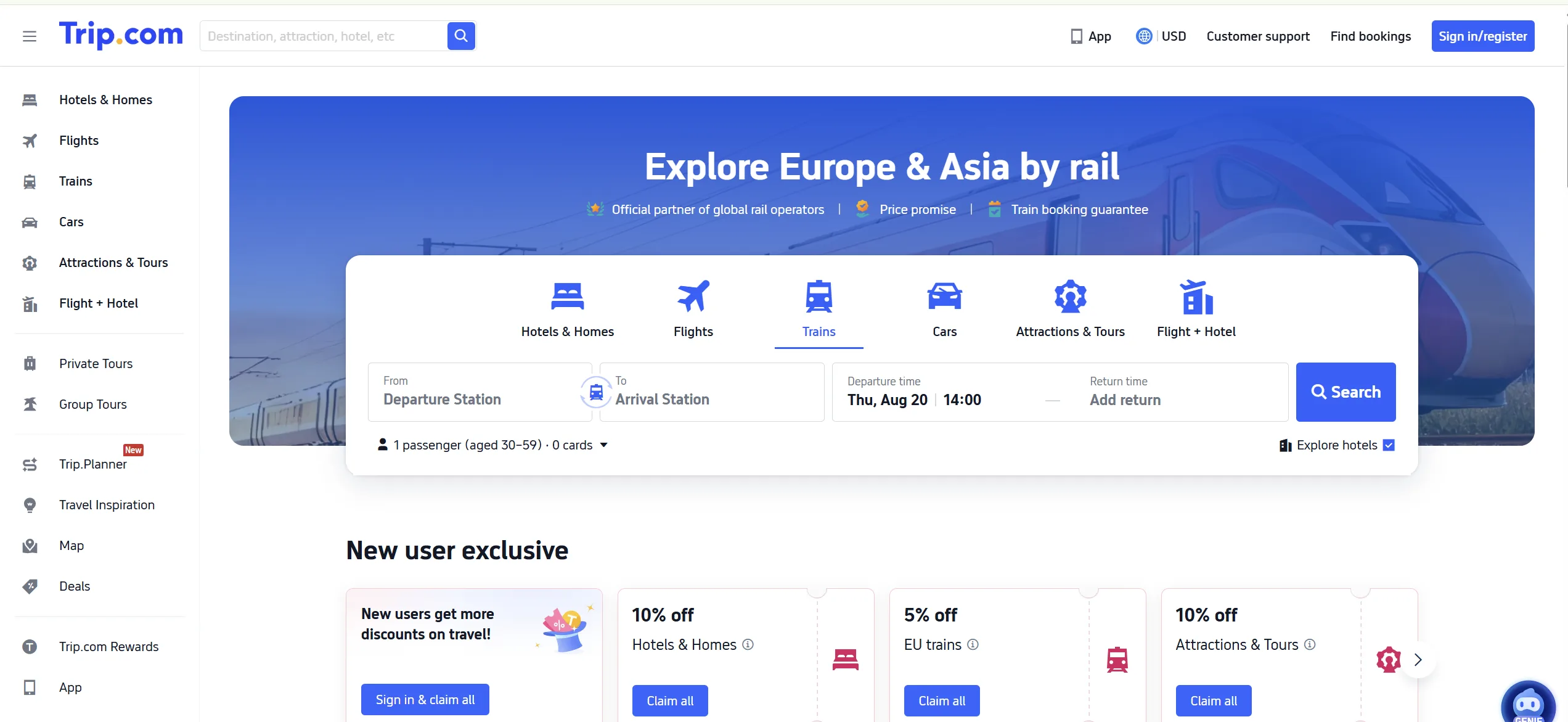
Travel-Day Checklist
Before leaving for the station, make sure you have:
- The original passport used for booking
- The correct departure station
- The station name saved in Chinese
- Your train number
- Coach and seat information
- An offline screenshot of the order
- Enough time for security and passport checks
- A charged phone and power bank
Check the station name again before getting into a taxi or DiDi. Going to the wrong railway station is one of the most difficult last-minute mistakes to fix.
FAQ
Is there an official 12306 English app?
What is the official 12306 English website?
https://www.12306.cn/en/
Can foreigners register on 12306?
Do I need a Chinese phone number?
Can I use an international card on 12306?
Do I need to print the train ticket?
Can I board with a screenshot?
Can I buy tickets for another person?
What should I do if the gate cannot read my passport?
More to read
How to Use Public Transport in China: Metro, Buses & QR Codes for Tourists (2026)
2026.08.31
QR Code Payment in China: How to Scan and Pay as a Foreigner (2026)
2026.08.31